Surface Vibration Correction
The Vibration Correction tool analyzes variation in surface data to remove high frequency noise in the data. The tool is useful for improving repeatability and accuracy of measurements when subtle vibrations in your transport system introduce height variations. The tool's intended use is to send corrected surface data to other tools.

|
The Vibration Correction tool requires at least 64 lines of data in the surface data it receives as input to be able to output corrected surface data. |
For information on adding, managing, and removing tools, as well as detailed descriptions of settings common to most tools, see Tool Configuration.
Inputs
You configure the tool's inputs in the expandable Inputs section.
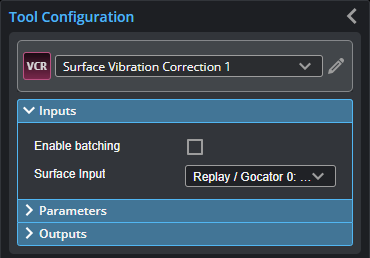
| Name | Description |
|---|---|
| Enable Batching |
For more information on arrays, batching, and aggregating, see Arrays, Batching, and Aggregation. |
|
Surface Input |
The data the tool applies measurements to or processes. |
Parameters
You configure the tool's parameters in the expandable Parameters section.
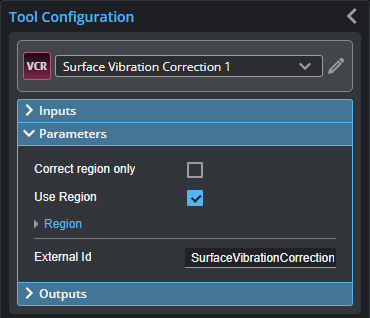
| Parameter | Description |
|---|---|
|
Correct Region Only |
If enabled, only the area under the region is corrected for vibration in the Surface data the tool outputs. This setting can be useful if vibration regularly occurs in a specific area of the scan data. When disabled, the tool applies correction to all of the scan data. This option is only displayed if Use Region is enabled. |
|
Use Region |
When enabled, lets you set a region and optionally choose to apply vibration correction only to that region (by enabling Correct Region only). |
|
Region |
The region whose data the tool will use to calculate the vibration correction. If Correct Region Only is enabled, the tool applies vibration correction only to the region. If Correct Region Only is disabled, the tool applies vibration correction to all of the scan data. |
|
External ID |
The external ID of the tool that appears in GoHMI Designer. For more information, see GoHMI and GoHMI Designer. |
Outputs
All tools provide measurements, geometric features, or data as outputs.
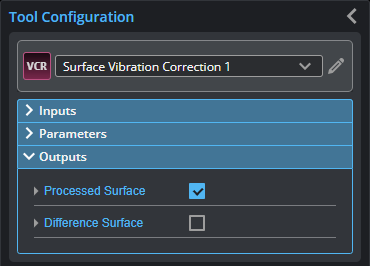
| Type | Description |
|---|---|
|
Processed Surface |
Surface data corrected for vibration, available for use as input in other tools. |
|
Difference Surface |
Diagnostic Surface data showing the difference between the corrected surface and the original. |